Shopify Bundle-App-Checkliste: Der vollständige Händlerleitfaden für 2026
Die wichtigste Frage lautet nicht: „Welche Shopify-Bundle-App bietet die meisten Funktionen?“ Es lautet: „Welche App passt zu der Art und Weise, wie mein Shop tatsächlich verkauft?“ Eine Bundle-App wirkt sich auf Lagerbestände, Rabatte, Produktvarianten, mobiles Einkaufen und Checkout-Verhalten aus. Die Auswahl nur auf der Grundlage von Bewertungen oder Funktionslisten kann später zu unnötiger Komplexität führen. Die beste Bundle-App ist diejenige, die zuverlässig mit Ihren Produkten, Werbeaktionen und der Kaufreise Ihrer Kunden zusammenarbeitet, wenn Ihr Geschäft wächst.

Inhaltsverzeichnis
- Warum die Wahl der falschen Bundle-App kostspielig ist
- Kurzer Überblick: Dinge, die Sie vor der Installation einer Shopify Bundle-App überprüfen sollten
- Bundle-Typen, nach denen Sie in einer Shopify-Bundle-App suchen sollten
- Technische Dinge, die vor der Installation einer Shopify Bundle-App überprüft werden müssen
- Feature-Checkliste: Was die App tatsächlich leisten muss
- Preis- und Kostenprüfungen
- Zuverlässigkeits- und Supportprüfungen
- Fragen, die Sie sich vor der Installation stellen sollten
- Warnsignale, auf die Sie achten sollten
- Fazit
- Was Sie vor der Installation einer Shopify Bundle-App überprüfen sollten: FAQs
Wenn es darum geht, die Leistung Ihres Shopify-Shops zu steigern, kann eine Bundle-App den entscheidenden Unterschied machen. Allerdings installieren viele Händler überstürzt eine Shopify-Bundle-App, ohne vorher genau zu wissen, was sie überprüfen müssen. Dies kann zu Zeitverschwendung bei der Migration, App-Konflikten oder, noch schlimmer, zur Beschädigung der Storefront führen. Um diese Fallstricke zu vermeiden, benötigen Sie eine umfassende Checkliste, um sicherzustellen, dass Sie die richtige App für Ihre Bedürfnisse installieren. In diesem Blog führen wir Sie durch die Dinge, die Sie vor der Installation einer Shopify-Bundle-App überprüfen sollten, um für den Erfolg gerüstet zu sein.
Zusammenfassung
Bevor Sie eine Bundle-App installieren, ermitteln Sie, welche Art von Bundle Sie tatsächlich benötigen – feste Bundles, Mix-and-Match, Build-a-Box, Mengenrabatte oder Cross-Selling-Angebote.
Überprüfen Sie, ob die App die Synchronisierung des Lagerbestands, die Variantenverwaltung, Rabattregeln, das mobile Erlebnis und die Checkout-Kompatibilität unterstützt, da diese Auswirkungen auf den täglichen Betrieb und das Kundenerlebnis haben.
Eine gute Bundle-App sollte zur Wachstumsphase Ihres Shops, zur Komplexität des Produktkatalogs und zur Werbestrategie passen und nicht einfach nur die meisten Funktionen bieten.
Das Testen eines echten Bundle-Workflows vor der vollständigen Implementierung hilft, betriebliche Probleme nach der Einführung zu vermeiden.
Weitere Informationen zur Auswahl der richtigen App finden Sie in unserem Blog Beste Shopify-Bundle-Apps.
Warum die Wahl der falschen Bundle-App kostspielig ist
Die Installation der falschen Shopify-Bundle-App kann mehr als nur eine Unannehmlichkeit sein. Es kann Sie wertvolle Zeit und Geld kosten. Die Checkliste für die Shopify-Bundle-App ist unerlässlich, um diese kostspieligen Fehler zu vermeiden.
Defekte Themen: Einige Bundle-Apps lassen sich möglicherweise nicht nahtlos in das Design Ihres Shops integrieren, was zu fehlerhaften Layouts oder nicht übereinstimmendem Stil führt. Dies kann zu einer schlechten Benutzererfahrung führen und potenzielle Kunden abschrecken.
Bestandsabweichungen: Eine mangelhafte Installation kann zu Bestandsfehlern führen, beispielsweise zu falschen Bestandszählungen oder Produktinkongruenzen. Dies kann Kunden verwirren und möglicherweise zu Über- oder Unterverkäufen führen, was Ihrem Ruf schaden kann.
App-Konflikte: Nicht alle Apps funktionieren gut zusammen. Einige Bundle-Apps können mit anderen von Ihnen verwendeten Apps in Konflikt geraten und zu Leistungsproblemen, Abstürzen oder unerwartetem Verhalten führen. Diese Konflikte können die Funktionalität Ihres Shops beeinträchtigen und Ihren Betrieb und die Kundenzufriedenheit beeinträchtigen.
Umsatzeinbußen während der Umstellung: Die Migration von einer Bundle-App zu einer anderen kann dazu führen, dass die Bundle-Angebote Ihres Shops vorübergehend nicht verfügbar sind. Diese Ausfallzeit kann sich direkt auf den Umsatz auswirken, insbesondere während der Haupteinkaufssaison.
Zeitaufwändige Migration: Das Wechseln von Apps oder das Beheben von Fehlern kann ein langwieriger und mühsamer Prozess sein. Je länger es dauert, diese Probleme zu beheben, desto mehr Zeit verschwenden Sie, die Sie für den Ausbau Ihres Unternehmens oder die Kundenbetreuung hätten verwenden können.
Kurzer Überblick: Dinge, die Sie vor der Installation einer Shopify Bundle-App überprüfen sollten
Bündeltyp | Technische Dinge | Funktionscheckliste | Preis- und Kostenprüfungen | Zuverlässigkeits- und Supportprüfungen |
|---|---|---|---|---|
Flexible Bundle-Erstellung | Kompatibilität mit Shopify-Plänen | Platzierung der Bundle-Anzeige | Kostenlose Testversion verfügbar | Qualität und Aktualität von App-Bewertungen im Shopify App Store |
Mix-and-Match-Pakete | Theme-Kompatibilität | Flexibilität bei der Rabattart | Aufschlüsselung der Preisstufen und was sich hinter höheren Plänen verbirgt | Verlauf und Aktivität der Entwickleraktualisierungen |
Bauen Sie Ihre eigene Box | Auswirkungen auf die Seitenladegeschwindigkeit | Mix and Match und BYOB-Unterstützung | Bündeln oder bestellen Sie Volumenobergrenzen für Basispläne | Support-Kanäle verfügbar |
Volumenpakete | Handhabung von Variantenlimits | Support für Volumen- und Staffelrabatte | Versteckte Transaktionsgebühren oder Nutzungsgebühren | Reaktionszeit während der Hauptverkehrszeiten |
Cross-Selling-Pakete | Kompatibilität von Checkout und Rabattcode | Mobile Storefront-Erlebnis | Preis-Leistungs-Verhältnis im Verhältnis zum monatlichen Bestellvolumen Ihres Shops | Händler-Feedback von Geschäften |
Fix-/Produkt-Kit-Bundles | Genauigkeit der Inventarsynchronisierung | Unterstützung mehrerer Währungen und Sprachen | ||
BOGO / Kaufe X und erhalte Y | Integration mit bestehenden Apps | Einrichtung und Konfiguration ohne Code | ||
Abonnementpakete | Analyse und Paketleistungsverfolgung | |||
Multipack-Bundles | ||||
Pakete nach dem Kauf | ||||
Kostenlose Geschenkpakete | ||||
Kaufen Sie die Look-/Lookbook-Bundles |
Bundle-Typen, nach denen Sie in einer Shopify-Bundle-App suchen sollten
Bevor Händler sich mit den Besonderheiten der App-Funktionen befassen, ist es für Händler wichtig zu verstehen, welche Arten von Paketen ihr Shop wirklich benötigt. Jeder Pakettyp dient einem anderen Geschäftsziel. Daher ist es wichtig, die Funktionen der App an den Zielen Ihres Shops auszurichten.
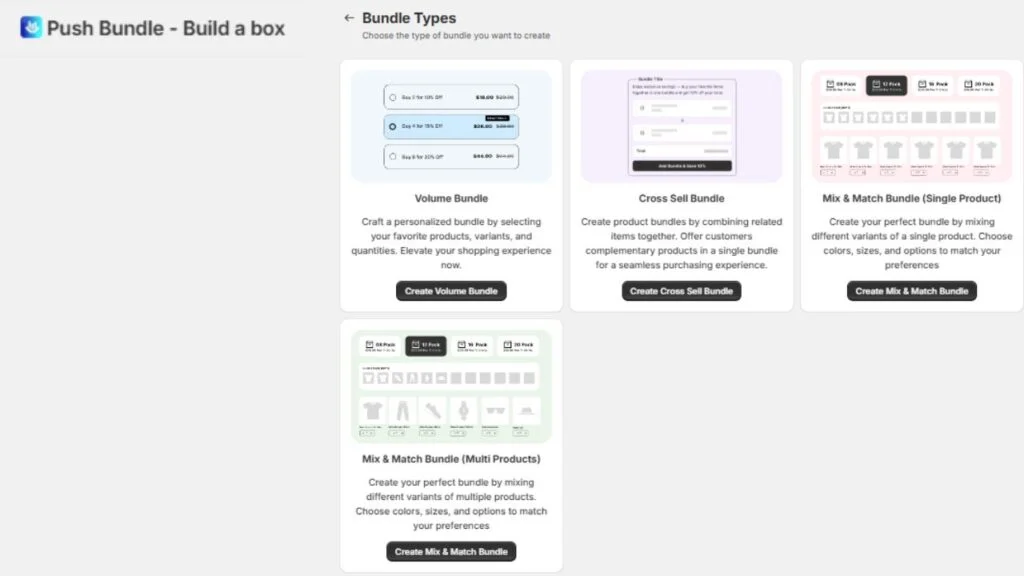
Flexible Bundle-Erstellung: Ermöglicht Ihnen die Erstellung benutzerdefinierter Pakete basierend auf verschiedenen Produktkombinationen. Diese Flexibilität trägt dazu bei, auf verschiedene Kundenwünsche einzugehen.
Mix-and-Match-Pakete: Kunden können aus einer Reihe von Produkten auswählen und ihr eigenes Paket zusammenstellen. Dies ermutigt Kunden, mehr zu kaufen und bietet ihnen gleichzeitig Auswahl und Flexibilität.
Bauen Sie Ihre eigene Box: Kunden wählen aus einer Auswahl an Produkten aus, um ihr eigenes personalisiertes Paket zusammenzustellen. Ideal für Geschäfte, die personalisierte Erlebnisse anbieten.
Volumenpakete: Bieten Sie Rabatte basierend auf der Menge der gekauften Artikel an. Ideal für B2B- oder Großeinkaufunternehmen, die größere Bestellungen tätigen möchten.
Cross-Selling-Pakete: Schlagen Sie automatisch ergänzende Produkte vor, die gut zu dem passen, was der Kunde bereits kauft, und erhöhen Sie so den durchschnittlichen Bestellwert.
Fix-/Produkt-Kit-Bundles: Vorverpackte Pakete mit gruppierten Set-Produkten, ideal zum Anbieten von Geschenksets oder Produktkits.
BOGO / Kaufe X und erhalte Y: Dieser beliebte Pakettyp bietet Kunden einen Anreiz, mehr zu kaufen, indem sie beim Kauf eines bestimmten Produkts einen kostenlosen Artikel oder einen Rabatt anbieten.
Abonnementpakete: Ermöglicht Ihnen das Anbieten wiederkehrender Produktpakete für abonnementbasierte Dienste, ideal für Verbrauchsgüter.
Multipack-Bundles: Diese Pakete verkaufen mehrere Mengen desselben Produkts und bieten einen Rabatt bei Großeinkäufen.
Pakete nach dem Kauf: Bieten Sie Ihren Kunden nach dem Bestellvorgang zusätzliche Produkte an, fördern Sie so Impulskäufe und steigern Sie den Bestellwert.
Kostenlose Geschenkpakete: Bieten Sie einen kostenlosen Artikel an, wenn ein Kunde ein bestimmtes Produkt kauft oder eine bestimmte Ausgabenschwelle erreicht, und erhöhen Sie so die Kundenzufriedenheit.
Kaufen Sie die Look-/Lookbook-Bundles: Präsentieren Sie thematische Produktkollektionen oder Outfits, sodass Kunden mit einem Klick einen kompletten Look oder ein komplettes Set kaufen können.
Jeder dieser Pakettypen kann dazu beitragen, den Umsatz zu steigern, die Kundenzufriedenheit zu verbessern und das Einkaufserlebnis für verschiedene Geschäftsmodelle zu optimieren. Wählen Sie diejenige aus, die am besten zu den Zielen Ihres Shops passt.
Technische Dinge, die vor der Installation einer Shopify Bundle-App überprüft werden müssen
Es gibt ein paar technische Aspekte, die oft übersehen werden, aber sie sind entscheidend dafür, dass alles reibungslos funktioniert. Hier sind die technischen Dinge, die Sie vor der Installation einer Shopify-Bundle-App überprüfen sollten:
Platzierung der Bundle-Anzeige: Wo werden die Bundles erscheinen? Idealerweise sollte es auf der Produktseite, im Warenkorb oder sogar nach dem Bezahlen angezeigt werden.
Flexibilität der Rabattart: Die App sollte verschiedene Rabattarten wie prozentualen Rabatt, Festbeträge, kostenlosen Versand oder sogar BOGO-Angebote anbieten. Mehr Optionen geben Ihnen Flexibilität.
Mix and Match und BYOB-Unterstützung: Können Kunden ihre Produkte auswählen oder ihre eigene Box zusammenstellen? Wenn Sie dieses Maß an Anpassung wünschen, stellen Sie sicher, dass die App dies unterstützt.
Mengen- und Staffelrabattunterstützung: Prüfen Sie, ob die App Mengenrabatte (mehr kaufen, mehr sparen) oder Staffelpreise für größere Bestellungen verarbeiten kann.
Mobile Storefront-Erlebnis: Ihre Pakete sollten auf Mobilgeräten genauso gut aussehen wie auf dem Desktop. Überprüfen Sie, ob die App für Mobilgeräte geeignet ist.
Unterstützung mehrerer Währungen und Sprachen: Wenn Sie international verkaufen, stellen Sie sicher, dass die App mehrere Währungen und Sprachen unterstützt.
Einrichtung und Konfiguration ohne Code: Im Idealfall sollte die App einfach einzurichten sein, ohne dass man sich in den Code vertiefen muss. Sie wollen etwas Schnelles und Unkompliziertes.
Analyse und Bundle-Performance-Tracking: Suchen Sie nach einer App, die Ihnen detaillierte Analysen zur Leistung Ihrer Bundles liefert. Dies hilft Ihnen, den Verkauf zu optimieren.
Feature-Checkliste: Was die App tatsächlich leisten muss
Nachdem Sie nun die technischen Prüfungen durchgeführt haben, ist es an der Zeit, sich anzusehen, was die App tatsächlich tun muss. Hier ist eine Checkliste für die Shopify-Bundle-App mit den wichtigsten Funktionen, die Sie berücksichtigen sollten:
Platzierung der Bundle-Anzeige: Wo werden die Bundles erscheinen? Stellen Sie sicher, dass die App Bundles auf der Produktseite, im Warenkorb und bei Bedarf auch nach dem Kauf anzeigen kann.
Flexibilität der Rabattart: Die App sollte verschiedene Rabattarten wie prozentualen Rabatt, Festbeträge, kostenloser Versand oder BOGO unterstützen. Mehr Optionen ermöglichen Flexibilität in Ihrer Marketingstrategie.
Mix and Match und BYOB-Unterstützung: Wenn Sie möchten, dass Kunden ihre Pakete individuell anpassen, stellen Sie sicher, dass die App die Funktionalität „Mix and Match“ oder „Build Your Own Box“ unterstützt. Drittanbieter Shopify-Bundle-App wie PushBundle verfügt über beide Funktionen. Sie können Mix-and-Match-Pakete mit einzelnen oder mehreren Produkten erstellen.
Mengen- und Staffelrabattunterstützung: Für B2B- oder Großeinkaufgeschäfte sollte die App mengenbasierte oder gestaffelte Rabatte unterstützen (z. B. mehr kaufen, mehr sparen).
Mobile Storefront-Erlebnis: Stellen Sie sicher, dass die App vollständig für Mobilgeräte optimiert ist. Das Einkaufserlebnis sollte auf Mobilgeräten genauso reibungslos sein wie auf dem Desktop.
Unterstützung mehrerer Währungen und Sprachen: Wenn Sie international verkaufen, stellen Sie sicher, dass die App mehrere Währungen und Sprachen unterstützt, um ein globales Publikum anzusprechen.
Einrichtung und Konfiguration ohne Code: Suchen Sie nach einer App, die einfach einzurichten ist, ohne dass Sie sich in den Code vertiefen müssen. Ein No-Code-Setup stellt sicher, dass Sie ohne technische Vorkenntnisse schnell loslegen können.
Analyse und Bundle-Performance-Tracking: Die App sollte detaillierte Analysen bieten, damit Sie die Leistung Ihrer Pakete verfolgen und optimieren können, um bessere Verkaufsergebnisse zu erzielen.
Preis- und Kostenprüfungen
Bevor Sie sich finanziell für eine Shopify-Bundle-App entscheiden, sollten Sie die folgenden Dinge prüfen, bevor Sie eine Shopify-Bundle-App installieren, um sicherzustellen, dass Sie den besten Gegenwert erhalten:
Verfügbarkeit der kostenlosen Testversion: Prüfen Sie, ob die App eine kostenlose Testversion anbietet, damit Sie die Funktionen testen können, bevor Sie eine Verpflichtung eingehen.
Aufschlüsselung der Preisstufen: Schauen Sie sich die Preisstufen an und sehen Sie, welche Funktionen auf den einzelnen Ebenen verfügbar sind. Seien Sie sich bewusst, was sich hinter höherstufigen Plänen verbirgt.
Volumenobergrenzen bündeln oder bestellen: Einige Apps begrenzen die Anzahl der Pakete oder Bestellungen, die Sie im Basisplan bearbeiten können. Stellen Sie sicher, dass der Plan Ihren Bedürfnissen entspricht.
Versteckte Transaktionsgebühren: Achten Sie auf versteckte Gebühren wie Transaktionsgebühren oder zusätzliche Kosten pro Paket oder Bestellung.
Preis-Leistungs-Verhältnis: Berücksichtigen Sie den Preis der App im Verhältnis zum monatlichen Bestellvolumen Ihres Shops. Stellen Sie sicher, dass Sie ein gutes Preis-Leistungs-Verhältnis erhalten.
Zuverlässigkeits- und Supportprüfungen
Stellen wir die Zuverlässigkeit und den Support der App sicher:
Qualität und Aktualität der App-Überprüfung: Sehen Sie sich aktuelle Rezensionen im Shopify App Store an, um die aktuelle Leistung und Kundenzufriedenheit der App zu beurteilen.
Entwickler-Update-Verlauf: Überprüfen Sie, wie oft die App aktualisiert wird und ob der Entwickler aktiv an der Wartung und Verbesserung der App beteiligt ist.
Verfügbare Supportkanäle: Sehen Sie, welche Supportoptionen verfügbar sind (Live-Chat, E-Mail oder Dokumentation) und wie reaktionsschnell sie während der Spitzenzeiten sind.
Händler-Feedback: Holen Sie Feedback von Geschäften ähnlicher Größe und Nische ein, um sicherzustellen, dass die App Ihren spezifischen Anforderungen entspricht.
Fragen, die Sie sich vor der Installation stellen sollten
Wenn Sie über eine Shopify-Bundle-App nachdenken, nehmen Sie sich einen Moment Zeit, um Ihre eigenen Bedürfnisse zu beurteilen. Hier sind einige Fragen zur Selbsteinschätzung:
Welche Bundle-Typen benötige ich eigentlich gerade? Klären Sie, welche Bundle-Formate zu Ihren Zielen passen.
Wie groß ist mein Produktkatalog und wie viele Bundles werde ich ausführen? Informieren Sie sich über die Größe Ihres Shops, um zu beurteilen, ob die App Ihren Anforderungen entspricht.
Verkaufe ich international? Stellen Sie sicher, dass die App die Funktionalität mehrerer Währungen und Sprachen unterstützt.
Habe ich einen Entwickler oder benötige ich eine vollständig codefreie Lösung? Stellen Sie fest, ob Sie eine anpassbare Lösung oder eine einfach zu installierende Lösung benötigen.
Habe ich einen Shopify-Plan, der die von mir benötigten Funktionen unterstützt? Stellen Sie sicher, dass Ihr aktueller Plan die Funktionalität der App unterstützt.
Wird diese App mit meinem aktuellen Abonnement oder meiner Treue-App in Konflikt geraten? Prüfen Sie, ob die Bundle-App nahtlos mit anderen wichtigen Apps in Ihrem Store funktioniert.
Warnsignale, auf die Sie achten sollten
Bei der Auswahl einer Shopify-Bundle-App ist es wichtig, auf bestimmte Warnzeichen zu achten, die darauf hinweisen, dass sich die Installation der App möglicherweise nicht lohnt. Hier sind einige Dinge, die Sie vor der Installation einer Shopify-Bundle-App überprüfen sollten, um sicherzustellen, dass Sie die richtige Wahl treffen:
Letzte Aktualisierung vor über 12 Monaten: Wenn die App nicht kürzlich aktualisiert wurde, ist sie möglicherweise veraltet und verfügt nicht über die neuesten Funktionen oder Kompatibilität.
Keine Reaktion auf negative Bewertungen des Entwicklers: Entwickler, die negatives Feedback ignorieren, reagieren möglicherweise nicht auf Probleme oder Fehler, was ein Warnsignal für zukünftigen Support ist.
Der kostenlose Plan hat keine sinnvollen Funktionen: Wenn es sich bei dem kostenlosen Plan nur um eine Köderstufe ohne wirkliche Funktionalität handelt, ist er wahrscheinlich darauf ausgelegt, Sie dazu zu drängen, für Funktionen zu zahlen, die eigentlich enthalten sein sollten.
Keine Dokumentation oder Hilfecenter: Das Fehlen eines Support-Leitfadens oder eines Hilfecenters erschwert die Fehlerbehebung und kann zu Frustration führen, wenn Sie Hilfe benötigen.
Vage Behauptungen zur Inventarsynchronisierung: Wenn die App keine klaren technischen Details zur Synchronisierung des Inventars bereitstellt, kann es zu Synchronisierungsfehlern kommen.
Beschwerden über langsamere Ladenfronten: Achten Sie auf Bewertungen, in denen Verlangsamungen erwähnt werden. Wenn die App Ihre Seitengeschwindigkeit beeinträchtigt, könnte dies Ihren Verkäufen schaden.
Überhaupt keine kostenlose Testversion: Eine App ohne kostenlose Testversion ist ein großes Warnsignal. Wie können Sie die Funktionalität der App testen, ohne sich finanziell zu verpflichten?
Fazit
Die Wahl der richtigen Shopify-Bundle-App ist entscheidend für den Erfolg Ihres Shops. Indem Sie die Shopify-Bundle-App-Checkliste befolgen, stellen Sie sicher, dass sich die App nahtlos in Ihr Theme integriert, Ihre AOV-Strategie verbessert und ein reibungsloses Kundenerlebnis bietet. Eine gut geeignete Bundle-App spart Zeit, schützt Ihr Schaufenster vor Problemen wie fehlerhaften Layouts oder Inventarfehlern und bereitet Sie auf langfristige Rentabilität vor. Überstürzen Sie Ihre Entscheidung nicht; Wenn Sie jetzt Zeit investieren, um die richtige App zu finden, wird sich das auszahlen, da Sie später höhere Umsätze erzielen und sich weniger Sorgen machen müssen. Stellen Sie sicher, dass Ihre Bundle-App richtig passt!
Was Sie vor der Installation einer Shopify Bundle-App überprüfen sollten: FAQs
Was sollte ich vor der Installation einer Shopify-Bundle-App überprüfen?
Überprüfen Sie die Kompatibilität mit Ihrem Shopify-Plan, Theme und anderen Apps. Stellen Sie sicher, dass die App die von Ihnen benötigten Bundle-Typen unterstützt und die Seitenladegeschwindigkeit nicht beeinträchtigt.
Kann eine Bundle-App meinen Shopify-Shop verlangsamen?
Ja, einige Apps können sich negativ auf die Geschwindigkeit Ihres Shops auswirken. Testen Sie die App immer, um sicherzustellen, dass sie nicht zu Verlangsamungen führt.
Funktionieren Shopify-Bundle-Apps mit allen Themes?
Nicht alle Bundle-Apps sind mit jedem Theme kompatibel. Überprüfen Sie vor der Installation die Dokumentation der App auf Theme-Kompatibilität.
Woher weiß ich, ob eine Bundle-App meinen Shopify-Plan unterstützt?
Überprüfen Sie die Preisdetails und die Funktionsliste der App, um sicherzustellen, dass sie mit der Stufe Ihres Shopify-Plans kompatibel ist.
Was passiert mit meinem Inventar, wenn ein Paket verkauft wird?
Die App sollte den Bestand automatisch synchronisieren. Wenn ein Paket verkauft wird, werden die Lagerbestände der enthaltenen Produkte entsprechend angepasst.
Auf Richtigkeit geprüft
Dieser Artikel wurde vom PushBundle Technical Support Team geprüft, das Shopify-Händler regelmäßig beim Testen von Bundle-Einrichtung, Produktauswahlregeln, Bundle-Preisen, Warenkorbverhalten und Checkout-bezogenen Bundle-Problemen unterstützt.
Über den Autor

Syeda Rehnoma Tanzom
PushBundle-Mitwirkender
This article is written by Syeda Rehnoma Tanzom, an SEO content writer with 3+ years of experience specializing in eCommerce content. What makes the work here a little different? A close collaboration with support teams to understand what merchants are actually going through, their frustrations, their questions, and their wins. The goal is simple: write content that speaks to real problems, not just search engines. When not buried in keywords and content briefs, you'll find her nose-deep in a good book, binge-watching true crime documentaries or psychological thrillers, and occasionally switching gears with a feel-good rom-com.