Shopify バンドル アプリのチェックリスト: 2026 年の完全なマーチャント ガイド
最も重要な質問は、「最も多くの機能を備えている Shopify バンドル アプリはどれですか?」ではありません。それは、「私のストアの実際の販売方法に適合するアプリはどれですか?」です。バンドル アプリは、在庫、割引、製品バリエーション、モバイル ショッピング、チェックアウト動作に影響を与えます。評価や機能リストのみに基づいて選択すると、後で不必要な複雑さが生じる可能性があります。最良のバンドル アプリとは、ストアの成長に合わせて製品、プロモーション、顧客の購入プロセスに確実に対応できるアプリです。
目次
Shopify ストアのパフォーマンスを向上させることに関しては、バンドル アプリが大きな違いを生みます。しかし、多くの加盟店は、事前に確認すべき内容を十分に理解せずに、Shopify バンドルアプリのインストールを急いでいます。これにより、移行に時間の無駄が生じたり、アプリの競合が発生したり、さらに悪いことにストアフロントに損害が発生したりする可能性があります。これらの落とし穴を回避するには、ニーズに合った適切なアプリをインストールしていることを確認するための包括的なチェックリストが必要です。このブログでは、Shopify バンドル アプリをインストールする前に確認すべきことを説明し、成功に向けて準備します。
概要
バンドル アプリをインストールする前に、実際に必要なバンドルのタイプ (固定バンドル、ミックス アンド マッチ、ビルド ア ボックス、ボリューム ディスカウント、クロスセル オファーなど) を特定します。
アプリが在庫の同期、バリエーションの処理、割引ルール、モバイル エクスペリエンス、チェックアウトの互換性をサポートしているかどうかを確認してください。これらは日常業務と顧客エクスペリエンスに影響するためです。
優れたバンドル アプリは、単にほとんどの機能を提供するだけではなく、ストアの成長段階、製品カタログの複雑さ、プロモーション戦略に適合する必要があります。
完全な実装前に実際のバンドル ワークフローをテストすると、発売後の運用上の問題を回避できます。
適切なアプリの選択に関する詳細については、次のブログをご覧ください。 ベストShopifyバンドルアプリ。
間違ったバンドル アプリを選択するとコストがかかる理由
間違った Shopify バンドル アプリをインストールすると、単なる不便以上のものになる可能性があります。貴重な時間とお金がかかる可能性があります。 Shopify バンドル アプリのチェックリストは、こうしたコストのかかる間違いを避けるために不可欠です。
壊れたテーマ: 一部のバンドル アプリはストアのテーマとシームレスに統合されず、レイアウトが崩れたり、スタイルが一致しない場合があります。これにより、ユーザー エクスペリエンスが低下し、潜在的な顧客が遠ざかってしまう可能性があります。
在庫の不一致: 設置が不十分だと、在庫数の間違いや製品の不一致など、在庫エラーが発生する可能性があります。これは顧客を混乱させ、過剰販売または過小販売につながる可能性があり、どちらも評判を損なう可能性があります。
アプリの競合: すべてのアプリがうまく連携できるわけではありません。一部のバンドル アプリは、使用している他のアプリと競合し、パフォーマンスの問題、クラッシュ、または予期しない動作を引き起こす可能性があります。これらの競合は店舗の機能を混乱させ、運営や顧客満足度に悪影響を与える可能性があります。
切り替え中の販売損失: あるバンドル アプリから別のバンドル アプリに移行すると、ストアのバンドル オファーが一時的に利用できなくなる可能性があります。このダウンタイムは、特にショッピングのピークシーズンには売上に直接影響を与える可能性があります。
時間のかかる移行: アプリの切り替えやエラーの修正は、長くて面倒なプロセスになることがあります。これらの問題の解決に時間がかかるほど、ビジネスの成長や顧客へのサービスに費やすことができた時間を無駄にすることになります。
概要: Shopify バンドル アプリをインストールする前に確認すべきこと
バンドルタイプ | 技術的なこと | 機能チェックリスト | 価格とコストの確認 | 信頼性とサポートのチェック |
|---|---|---|---|---|
柔軟なバンドルの作成 | Shopify プランの互換性 | バンドルの表示位置 | 無料トライアルの利用可能性 | Shopify App Storeでのアプリレビューの品質と最新性 |
バンドルの組み合わせ | テーマの互換性 | 割引タイプの柔軟性 | 価格階層の内訳と上位プランの背後にあるもの | 開発者の更新履歴とアクティビティ |
独自のボックスを構築する | ページの読み込み速度への影響 | 組み合わせとBYOBのサポート | 基本プランのバンドルまたは注文量の上限 | 利用可能なサポートチャネル |
ボリュームバンドル | バリアント制限の処理 | 大量割引と段階的割引のサポート | 隠れた取引手数料または使用料 | ピーク時の応答時間 |
クロスセルバンドル | チェックアウトコードと割引コードの互換性 | モバイル店頭体験 | ストアの月間注文量と比較したコストパフォーマンス | 店舗からの販売者のフィードバック |
固定/製品キット バンドル | 在庫同期の精度 | 複数通貨と複数言語のサポート | ||
ボゴ / Xを買ってYを手に入れる | 既存のアプリとの統合 | コード不要のセットアップと構成 | ||
サブスクリプションバンドル | 分析とバンドルのパフォーマンス追跡 | |||
マルチパックバンドル | ||||
購入後のバンドル | ||||
無料ギフトバンドル | ||||
Look / Lookbook バンドルを購入する |
Shopify バンドル アプリで探す必要があるバンドル タイプ
アプリの機能の詳細に入る前に、販売者は自分のストアが本当に必要としているバンドルの種類を理解することが重要です。各バンドル タイプは異なるビジネス目標を達成するため、アプリの機能をストアの目標に合わせることが重要です。
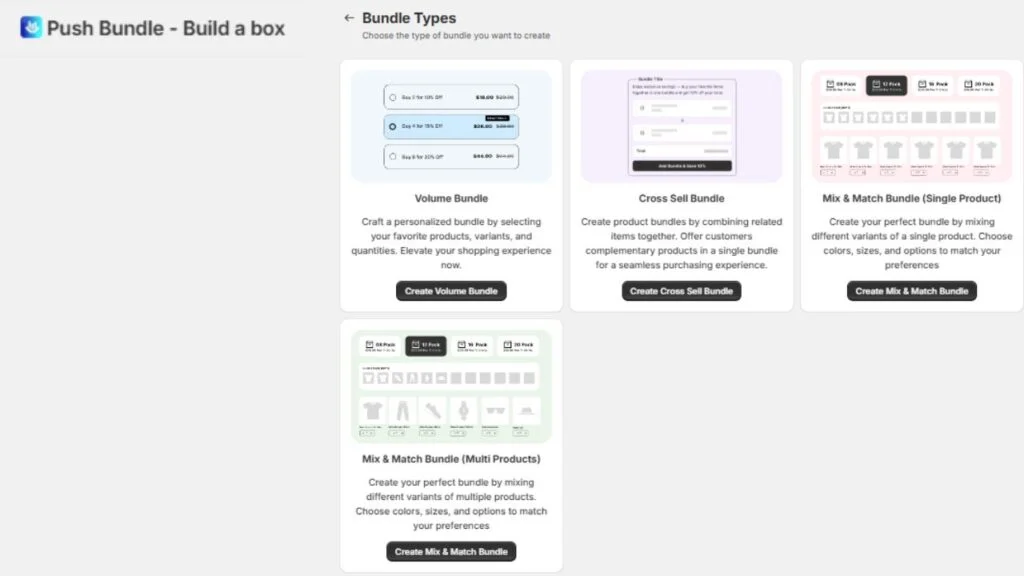
柔軟なバンドルの作成: さまざまな製品の組み合わせに基づいてカスタム バンドルを作成できます。この柔軟性は、顧客のさまざまな好みに応えるのに役立ちます。
バンドルの組み合わせ: 顧客は一連の製品から選択し、独自のバンドルを作成できます。これにより、顧客に選択肢と柔軟性を提供しながら、より多くの購入を促すことができます。
独自のボックスを構築: 顧客は選択肢から製品を選んで、独自のパーソナライズされたバンドルを構築します。パーソナライズされた体験を提供する店舗に最適です。
ボリュームバンドル: 購入した商品の数量に応じて割引を提供します。 B2B または大量注文を推進したい大量購入企業に最適です。
クロスセルバンドル: 顧客がすでに購入している商品と相性の良い補完的な商品を自動的に提案し、平均注文額を増加させます。
固定/製品キット バンドル: セット商品をひとまとめにしたパッケージ化されたバンドルで、ギフトセットや商品キットの提供に最適です。
BOGO / X を購入して Y を獲得: この人気のあるバンドル タイプは、顧客が特定の製品を購入するときに無料のアイテムや割引を提供することで、さらに購入するよう促します。
サブスクリプション バンドル: サブスクリプションベースのサービスに定期的な製品バンドルを提供できるため、消耗品に最適です。
マルチパックバンドル: これらのバンドルでは、同じ製品を複数個販売し、まとめ買いの割引を提供します。
購入後のバンドル: チェックアウトプロセス後に顧客に追加の商品を提供して、衝動買いを促進し、注文額を高めます。
無料ギフトバンドル: 顧客が特定の製品を購入したとき、または特定の支出しきい値に達したときに無料アイテムを提供し、顧客満足度を向上させます。
Look / Lookbook バンドルを購入: テーマに沿った製品コレクションや衣装を展示し、顧客がワンクリックで完全なルックやセットを購入できるようにします。
これらのバンドル タイプはそれぞれ、売上の増加、顧客満足度の向上、さまざまなビジネス モデルのショッピング エクスペリエンスの合理化に役立ちます。ストアの目標に最も合致するものを選択してください。
Shopify バンドル アプリをインストールする前に確認すべき技術的な事項
見落とされがちな技術的側面がいくつかありますが、それらはすべてがスムーズに機能するために重要です。 Shopify バンドル アプリをインストールする前に確認すべき技術的な事項は次のとおりです。
バンドル表示の配置: バンドルはどこに表示されますか?理想的には、商品ページ、カート内、またはチェックアウト後でも表示されるべきです。
割引タイプの柔軟性: アプリでは、パーセントオフ、定額、送料無料、さらには BOGO セールなど、さまざまな割引タイプを提供する必要があります。オプションが増えると柔軟性が高まります。
ミックス アンド マッチと BYOB のサポート: 顧客は製品を選択したり、独自のボックスを構築したりできますか?そのレベルのカスタマイズが必要な場合は、アプリがそれをサポートしていることを確認してください。
ボリューム割引と段階的割引のサポート: アプリがボリューム ディスカウント (より多く購入、より節約) または大量注文の段階的価格設定を処理できるかどうかを確認します。
モバイル店頭エクスペリエンス: バンドルは、モバイルでもデスクトップと同じように美しく見える必要があります。アプリがモバイル対応であることを確認してください。
複数通貨と複数言語のサポート: 海外で販売する場合は、アプリが複数の通貨と言語をサポートしていることを確認してください。
コード不要のセットアップと構成: 理想的には、アプリはコードを詳しく調べなくてもセットアップが簡単である必要があります。素早く簡単な操作が必要です。
分析とバンドル パフォーマンスの追跡: バンドルのパフォーマンスを詳細に分析できるアプリを探してください。これは販売の最適化に役立ちます。
機能チェックリスト: アプリが実際に行う必要があること
技術的なチェックは完了しました。次は、アプリが実際に何を行う必要があるかを見ていきます。考慮すべき主な機能の Shopify バンドル アプリのチェックリストは次のとおりです。
バンドル表示の配置: バンドルはどこに表示されますか?アプリが製品ページ、カート内、さらに必要に応じて購入後にもバンドルを表示できることを確認してください。
割引タイプの柔軟性: アプリは、パーセントオフ、定額、送料無料、BOGO などのさまざまな割引タイプをサポートする必要があります。オプションが増えると、マーケティング戦略を柔軟に行うことができます。
ミックス アンド マッチと BYOB のサポート: 顧客にバンドルをカスタマイズしてもらいたい場合は、アプリが「Mix and Match」または「Build Your Own Box」機能をサポートしていることを確認してください。サードパーティ Shopifyバンドルアプリ PushBundle には両方の機能があります。単一または複数の製品を組み合わせたバンドルを作成できます。
ボリューム割引と段階的割引のサポート: B2B または大量購入ストアの場合、アプリはボリュームベースまたは段階的な割引 (例: より多く購入、より節約) をサポートする必要があります。
モバイル店頭エクスペリエンス: アプリがモバイル向けに完全に最適化されていることを確認してください。モバイルでもデスクトップと同様にショッピング体験がシームレスである必要があります。
複数通貨と複数言語のサポート: 海外で販売する場合は、世界中のユーザーに対応できるよう、アプリが複数の通貨と言語をサポートしていることを確認してください。
コード不要のセットアップと構成: コードを詳しく調べる必要がなく、簡単にセットアップできるアプリを探してください。コード不要のセットアップにより、技術的な背景がなくてもすぐに開始できます。
分析とバンドル パフォーマンスの追跡: このアプリは詳細な分析を提供し、バンドルのパフォーマンスを追跡し、より良い販売結果を目指して最適化できるようにする必要があります。
価格とコストの確認
Shopify バンドル アプリに金銭的にコミットする前に、Shopify バンドル アプリをインストールする前に以下の確認事項を必ず評価して、最大限の価値が得られるようにしてください。
無料トライアルの利用可能状況: アプリに無料試用版が提供されているかどうかを確認して、契約する前に機能をテストできるようにします。
価格帯の内訳: 価格帯を見て、各レベルでどのような機能が利用できるかを確認してください。上位プランの背後に何がロックされているかに注意してください。
バンドルまたは注文数量の上限: 一部のアプリでは、基本プランで処理できるバンドルまたは注文の数が制限されています。プランがニーズに合っていることを確認してください。
隠れた取引手数料: 取引手数料やバンドルまたは注文ごとの追加費用など、隠れた手数料に注意してください。
コストパフォーマンス: アプリの価格をストアの月間注文量と比較して検討してください。コストに見合った価値があることを確認してください。
信頼性とサポートのチェック
アプリの信頼性とサポートを確保しましょう。
アプリレビューの品質と最新性: Shopify App Store の最近のレビューを見て、アプリの現在のパフォーマンスと顧客満足度を評価します。
開発者更新履歴: アプリがどのくらいの頻度で更新されているか、開発者がアプリの保守と改善に積極的に取り組んでいるかどうかを確認してください。
利用可能なサポート チャネル: ライブ チャット、電子メール、ドキュメントなど、利用可能なサポート オプションと、ピーク時の対応を確認してください。
販売者のフィードバック: アプリが特定のニーズを満たしていることを確認するために、同様の規模とニッチのストアからフィードバックを求めてください。
インストールする前に自問すべき質問
Shopify バンドル アプリを検討する場合は、時間をかけて自分のニーズを評価してください。自己評価の質問は次のとおりです。
今実際に必要なのはどのバンドル タイプですか? どのバンドル形式が目標に合致するかを明確にします。
製品カタログのサイズはどれくらいですか? 実行するバンドルの数はどれくらいですか? ストアの規模を把握して、アプリがニーズに合わせて拡張できるかどうかを評価します。
海外でも販売できますか? アプリが複数通貨および複数言語の機能をサポートしていることを確認してください。
開発者はいますか? それとも完全にノーコードのソリューションが必要ですか? カスタマイズ可能なソリューションが必要か、それとも簡単にインストールできるものが必要かを判断してください。
必要な機能をサポートする Shopify プランを利用していますか? 現在のプランがアプリの機能をサポートしていることを確認してください。
このアプリは、現在のサブスクリプションまたはロイヤルティ アプリと競合しますか? バンドル アプリがストア内の他の重要なアプリとシームレスに動作するかどうかを確認してください。
注意すべき危険信号
Shopify バンドル アプリを選択するときは、アプリをインストールする価値がない可能性があることを示す特定の警告サインに注意することが重要です。正しい選択をするために、Shopify バンドル アプリをインストールする前に確認すべき事項がいくつかあります。
最終更新日: 12 か月以上前: アプリが最近更新されていない場合は、アプリが古くなり、最新の機能や互換性が欠けている可能性があります。
開発者からの否定的なレビューには返答なし: 否定的なフィードバックを無視する開発者は問題やバグに対応しない可能性があり、これは将来のサポートにとって危険信号です。
無料プランには意味のある機能はありません: 無料プランが実際の機能を持たない単なるおとり版である場合、含まれているはずの機能に対して料金を支払わせるように設計されている可能性があります。
ドキュメントやヘルプセンターがない: サポート ガイドやヘルプ センターがないとトラブルシューティングが困難になり、サポートが必要な場合にイライラする可能性があります。
曖昧な在庫同期の主張: アプリが在庫の同期方法について明確な技術的な詳細を提供しない場合、同期エラーが発生する可能性があります。
店頭の速度低下に関する苦情: 速度の低下について言及したレビューに注意してください。アプリがページ速度に影響を与えると、売上に悪影響を及ぼす可能性があります。
無料トライアルがまったくありません: 無料トライアルのないアプリは大きな危険信号です。資金を投入せずにアプリの機能をテストするにはどうすればよいでしょうか?
結論
ストアの成功には、適切な Shopify バンドル アプリを選択することが不可欠です。 Shopify バンドル アプリのチェックリストに従うことで、アプリがテーマとシームレスに統合され、AOV 戦略が強化され、スムーズなカスタマー エクスペリエンスが提供されるようになります。適切なバンドル アプリは時間を節約し、壊れたレイアウトや在庫エラーなどの問題から店頭を保護し、長期的な収益性をもたらします。決断を急ぐ必要はありません。今すぐ適切なアプリを見つけるために時間を投資することは、将来的に売上が増加し、頭痛の種が少なくなるという効果が得られます。バンドル アプリが適切に適合していることを確認してください。
Shopify バンドル アプリをインストールする前に確認すべきこと: よくある質問
Shopify バンドル アプリをインストールする前に何を確認する必要がありますか?
Shopify プラン、テーマ、その他のアプリとの互換性を確認します。アプリが必要なバンドル タイプをサポートしており、ページの読み込み速度に影響を与えていないことを確認してください。
バンドルアプリによってShopifyストアの速度が遅くなる可能性がありますか?
はい、一部のアプリはストアの速度に悪影響を与える可能性があります。常にアプリをテストして、速度低下が発生しないことを確認してください。
Shopify バンドル アプリはすべてのテーマで動作しますか?
すべてのバンドル アプリがすべてのテーマと互換性があるわけではありません。インストールする前に、アプリのドキュメントでテーマの互換性を確認してください。
バンドル アプリが Shopify プランをサポートしているかどうかを確認するにはどうすればよいですか?
アプリの価格詳細と機能リストを確認して、Shopify プランのレベルと互換性があることを確認してください。
バンドルが販売されると在庫はどうなりますか?
アプリは在庫を自動的に同期する必要があります。バンドルが販売されると、それに応じて含まれる製品の在庫レベルが調整されます。
正確性を確認済み
この記事は、Shopify マーチャントのバンドル設定、商品選択ルール、バンドル価格、カート動作、チェックアウト関連のバンドル問題のテストを日常的に支援している PushBundle テクニカルサポートチームによって監修されました。
著者について

Syeda Rehnoma Tanzom
PushBundle 寄稿者
This article is written by Syeda Rehnoma Tanzom, an SEO content writer with 3+ years of experience specializing in eCommerce content. What makes the work here a little different? A close collaboration with support teams to understand what merchants are actually going through, their frustrations, their questions, and their wins. The goal is simple: write content that speaks to real problems, not just search engines. When not buried in keywords and content briefs, you'll find her nose-deep in a good book, binge-watching true crime documentaries or psychological thrillers, and occasionally switching gears with a feel-good rom-com.