
Shopify Bundle App Checklist: The Complete Merchant Guide for 2026
The most important question isn’t “Which Shopify bundle app has the most features?” It’s “Which app fits the way my store actually sells?” A bundle app affects inventory, discounts, product variants, mobile shopping, and checkout behavior. Choosing one based only on ratings or feature lists can create unnecessary complexity later. The best bundle app is the one that works reliably with your products, promotions, and customer buying journey as your store grows.
Table of contents
- Why Choosing the Wrong Bundle App Is Costly
- Quick Overview: Things to Check Before Installing a Shopify Bundle App
- Bundle Types You Should Look for in a Shopify Bundle App
- Technical Things to Check Before Installing a Shopify Bundle App
- Feature Checklist: What the App Must Actually Do
- Pricing and Cost Checks
- Reliability and Support Checks
- Questions to Ask Yourself Before Installing
- Red Flags to Watch Out For
- Conclusion
- Things to Check Before Installing a Shopify Bundle App: FAQs
When it comes to boosting your Shopify store’s performance, a bundle app can make all the difference. However, many merchants rush into installing a Shopify bundle app without fully understanding what to check beforehand. This can lead to wasted time migrating, app conflicts, or even worse, damaging the storefront. To avoid these pitfalls, you need a comprehensive checklist to ensure you’re installing the right app for your needs. In this blog, we’ll guide you through the things to check before installing a Shopify bundle app to set you up for success.
Summary
Before installing a bundle app, identify the type of bundle you actually need—fixed bundles, mix-and-match, build-a-box, volume discounts, or cross-sell offers.
Check whether the app supports inventory syncing, variant handling, discount rules, mobile experience, and checkout compatibility, since these affect daily operations and customer experience.
A good bundle app should fit your store’s growth stage, product catalog complexity, and promotional strategy rather than simply offering the most features.
Testing a real bundle workflow before full implementation helps avoid operational issues after launch.
For more insights on choosing the right app, check out our blog on Best Shopify Bundle Apps.
Why Choosing the Wrong Bundle App Is Costly
Installing the wrong Shopify bundle app can be more than just an inconvenience. It can cost you valuable time and money. The Shopify bundle app checklist is essential to avoid these costly mistakes.
Broken Themes: Some bundle apps may not integrate seamlessly with your store’s theme, leading to broken layouts or mismatched styling. This can result in a poor user experience, driving potential customers away.
Inventory Discrepancies: A poor installation could lead to inventory errors, such as incorrect stock counts or product mismatches. This can confuse customers and potentially lead to overselling or underselling, both of which can damage your reputation.
App Conflicts: Not all apps play well together. Some bundle apps might conflict with other apps you’re using, causing performance issues, crashes, or unexpected behavior. These conflicts can disrupt your store’s functionality, hurting your operations and customer satisfaction.
Lost Sales During the Switch: Migrating from one bundle app to another can result in a period where your store’s bundle offers are temporarily unavailable. This downtime can directly impact sales, especially during peak shopping seasons.
Time-Consuming Migration: Switching apps or correcting errors can be a lengthy and tedious process. The longer it takes to fix these issues, the more time you waste, which could have been spent growing your business or serving customers.
Quick Overview: Things to Check Before Installing a Shopify Bundle App
Bundle Type | Technical Things | Feature Checklist | Pricing and Cost Checks | Reliability and Support Checks |
|---|---|---|---|---|
Flexible Bundle Creation | Shopify plan compatibility | Bundle display placement | Free trial availability | App review quality and recency on the Shopify App Store |
Mix and Match Bundles | Theme compatibility | Discount type flexibility | Pricing tier breakdown and what’s locked behind higher plans | Developer update history and activity |
Build Your Own Box | Impact on page load speed | Mix and match and BYOB support | Bundle or order volume caps on base plans | Support channels available |
Volume Bundles | Variant limit handling | Volume and tiered discount support | Hidden transaction fees or usage charges | Response time during peak hours |
Cross-Sell Bundles | Checkout and discount code compatibility | Mobile storefront experience | Value for money relative to your store’s monthly order volume | Merchant feedback from stores |
Fixed / Product Kit Bundles | Inventory syncing accuracy | Multi-currency and multi-language suppor | ||
BOGO / Buy X Get Y | Integration with existing apps | No-code setup and configuration | ||
Subscription Bundles | Analytics and bundle performance tracking | |||
Multipack Bundles | ||||
Post-Purchase Bundles | ||||
Free Gift Bundles | ||||
Shop the Look / Lookbook Bundles |
Bundle Types You Should Look for in a Shopify Bundle App
Before diving into the specifics of app features, it’s crucial for merchants to understand what types of bundles their store truly needs. Each bundle type serves a different business goal, so it’s important to align the app’s capabilities with your store’s objectives.
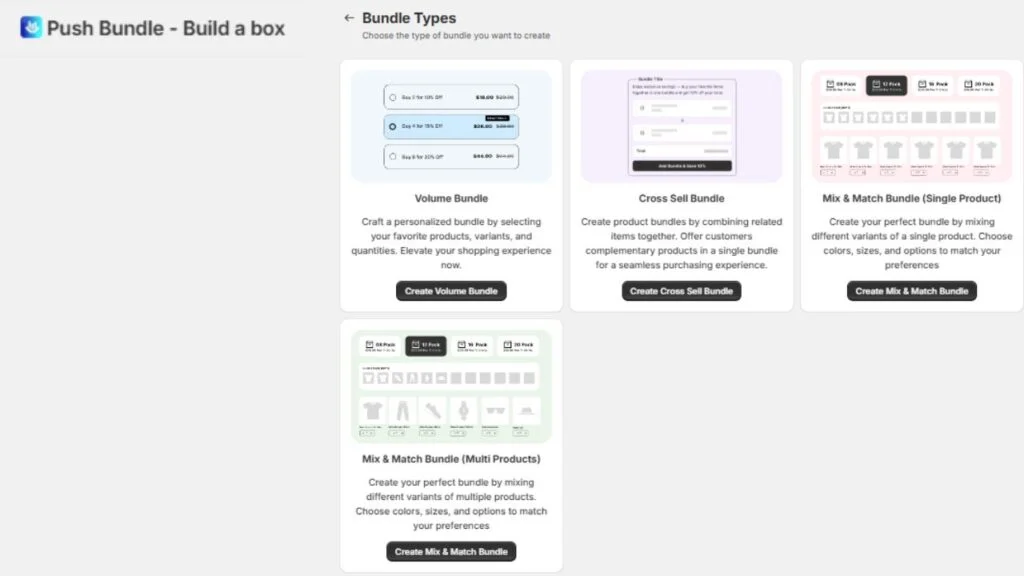
Flexible Bundle Creation: Allows you to create custom bundles based on different product combinations. This flexibility helps cater to various customer preferences.
Mix and Match Bundles: Customers can choose from a set of products and create their own bundle. This encourages customers to buy more while offering them choice and flexibility.
Build Your Own Box: Customers pick from a selection of products to build their own personalized bundle. Ideal for stores offering personalized experiences.
Volume Bundles: Offer discounts based on the quantity of items purchased. Great for B2B or bulk-buying businesses looking to drive larger orders.
Cross-Sell Bundles: Automatically suggest complementary products that go well with what the customer is already buying, increasing average order value.
Fixed / Product Kit Bundles: Pre-packaged bundles with set products that are grouped together, perfect for offering gift sets or product kits.
BOGO / Buy X Get Y: This popular bundle type incentivizes customers to purchase more by offering a free item or discount when they buy a specific product.
Subscription Bundles: Allows you to offer recurring product bundles for subscription-based services, ideal for consumable products.
Multipack Bundles: These bundles sell multiple quantities of the same product, offering a discount for bulk purchases.
Post-Purchase Bundles: Offer customers additional products after the checkout process, encouraging impulse buys and enhancing order value.
Free Gift Bundles: Provide a free item when a customer buys a specific product or reaches a certain spend threshold, increasing customer satisfaction.
Shop the Look / Lookbook Bundles: Showcase themed product collections or outfits, allowing customers to buy a complete look or set in one click.
Each of these bundle types can help boost sales, improve customer satisfaction, and streamline the shopping experience for different business models. Choose the one that aligns best with your store’s goals.
Technical Things to Check Before Installing a Shopify Bundle App
There are a few technical aspects that can often be overlooked, but they’re critical to ensuring everything works smoothly. Here are the technical things to check before installing a Shopify bundle app:
Bundle Display Placement: Where will the bundles appear? Ideally, it should show on the product page, in the cart, or even after checkout.
Discount Type Flexibility: The app should offer different discount types like percentage off, fixed amounts, free shipping, or even BOGO deals. More options give you flexibility.
Mix and Match and BYOB Support: Can customers choose their products or build their own box? If you want that level of customization, make sure the app supports it.
Volume and Tiered Discount Support: Check if the app can handle volume discounts (buy more, save more) or tiered pricing for larger orders.
Mobile Storefront Experience: Your bundles should look just as good on mobile as they do on desktop. Check that the app is mobile-friendly.
Multi-Currency and Multi-Language Support: If you’re selling internationally, ensure the app supports multiple currencies and languages.
No-Code Setup and Configuration: Ideally, the app should be easy to set up without needing to dive into the code. You want something quick and straightforward.
Analytics and Bundle Performance Tracking: Look for an app that gives you detailed analytics on how your bundles are performing. This will help you optimize sales.
Feature Checklist: What the App Must Actually Do
Now that you’ve covered the technical checks, it’s time to look at what the app actually needs to do. Here’s a Shopify bundle app checklist of key features to consider:
Bundle Display Placement: Where will the bundles appear? Make sure the app can display bundles on the product page, in the cart, and even post-purchase if needed.
Discount Type Flexibility: The app should support different discount types such as percentage off, fixed amounts, free shipping, or BOGO. More options allow for flexibility in your marketing strategy.
Mix and Match and BYOB Support: If you want customers to customize their bundles, ensure the app supports “Mix and Match” or “Build Your Own Box” functionality. Third-party Shopify bundle app like PushBundle has both the features. You can create mix and match bundles with single or multiple products.
Volume and Tiered Discount Support: For B2B or bulk-buy stores, the app should support volume-based or tiered discounts (e.g., buy more, save more).
Mobile Storefront Experience: Make sure the app is fully optimized for mobile. The shopping experience should be just as seamless on mobile as it is on desktop.
Multi-Currency and Multi-Language Support: If you’re selling internationally, ensure the app supports multiple currencies and languages to cater to a global audience.
No-Code Setup and Configuration: Look for an app that is easy to set up without needing to dig into the code. A no-code setup ensures you can get started quickly without a technical background.
Analytics and Bundle Performance Tracking: The app should offer detailed analytics, allowing you to track how well your bundles are performing and optimize for better sales results.
Pricing and Cost Checks
Before committing financially to a Shopify bundle app, make sure to evaluate the following things to check before installing a Shopify bundle app to ensure you’re getting the best value:
Free Trial Availability: Check if the app offers a free trial so you can test the features before making a commitment.
Pricing Tier Breakdown: Look at the pricing tiers and see what features are available at each level. Be aware of what’s locked behind higher-tier plans.
Bundle or Order Volume Caps: Some apps limit the number of bundles or orders you can handle on the base plan. Make sure the plan suits your needs.
Hidden Transaction Fees: Watch for any hidden fees, like transaction charges or additional costs per bundle or order.
Value for Money: Consider the app’s pricing relative to your store’s monthly order volume. Make sure you’re getting value for the cost.
Reliability and Support Checks
Lets ensure the app’s reliability and support:
App Review Quality and Recency: Look at recent reviews on the Shopify App Store to gauge the app’s current performance and customer satisfaction.
Developer Update History: Check how frequently the app is updated and whether the developer is active in maintaining and improving it.
Support Channels Available: See what support options are available, live chat, email, or documentation and how responsive they are during peak hours.
Merchant Feedback: Seek feedback from stores of similar size and niche to ensure the app meets your specific needs.
Questions to Ask Yourself Before Installing
When considering a Shopify bundle app, take a moment to assess your own needs. Here are some self-assessment questions:
What bundle types do I actually need right now? Clarify which bundle formats align with your goals.
How large is my product catalog, and how many bundles will I run? Know your store’s size to evaluate if the app can scale with your needs.
Do I sell internationally? Ensure the app supports multi-currency and multi-language functionality.
Do I have a developer, or do I need a fully no-code solution? Determine if you need a customizable solution or something simple to install.
Am I on a Shopify plan that supports the features I need? Make sure your current plan supports the app’s functionality.
Will this app conflict with my current subscription or loyalty app? Check if the bundle app will work seamlessly with other critical apps in your store.
Red Flags to Watch Out For
When choosing a Shopify bundle app, it’s essential to be cautious of certain warning signs that indicate the app may not be worth installing. Here are some things to check before installing a Shopify bundle app to ensure you’re making the right choice:
Last Updated Over 12 Months Ago: If the app hasn’t been updated recently, it may be outdated and lack the latest features or compatibility.
No Response to Negative Reviews from the Developer: Developers who ignore negative feedback might not be responsive to issues or bugs, which is a red flag for future support.
Free Plan Has No Meaningful Features: If the free plan is just a bait tier with no real functionality, it’s likely designed to push you into paying for features that should have been included.
No Documentation or Help Center: Lack of a support guide or help center makes troubleshooting difficult and can cause frustration if you need assistance.
Vague Inventory Sync Claims: If the app doesn’t provide clear technical details on how it syncs inventory, it could lead to syncing errors.
Complaints About Storefront Slowdowns: Watch for reviews mentioning slowdowns. If the app affects your page speed, it could hurt your sales.
No Free Trial at All: An app without a free trial is a huge red flag. How can you test the app’s functionality without committing financially?
Conclusion
Choosing the right Shopify bundle app is essential for your store’s success. By following the Shopify bundle app checklist, you ensure the app integrates seamlessly with your theme, enhances your AOV strategy, and provides a smooth customer experience. A well-suited bundle app saves time, protects your storefront from issues like broken layouts or inventory errors, and sets you up for long-term profitability. Don’t rush the decision; investing time in finding the right app now will pay off with higher sales and fewer headaches down the road. Make sure your bundle app is the right fit!
Things to Check Before Installing a Shopify Bundle App: FAQs
What should I check before installing a Shopify bundle app?
Check compatibility with your Shopify plan, theme, and other apps. Ensure the app supports the bundle types you need and doesn’t affect page load speed.
Can a bundle app slow down my Shopify store?
Yes, some apps can negatively impact your store’s speed. Always test the app to ensure it doesn’t cause slowdowns.
Do Shopify bundle apps work with all themes?
Not all bundle apps are compatible with every theme. Check the app’s documentation for theme compatibility before installing.
How do I know if a bundle app supports my Shopify plan?
Review the app’s pricing details and feature list to ensure it’s compatible with your Shopify plan’s tier.
What happens to my inventory when a bundle sells?
The app should sync inventory automatically. When a bundle sells, it adjusts stock levels for the included products accordingly.
Reviewed for accuracy
This article was reviewed by the PushBundle Technical Support Team, who regularly helps Shopify merchants test bundle setup, product selection rules, bundle pricing, cart behavior, and checkout-related bundle issues.
About the author

Syeda Rehnoma Tanzom
PushBundle Contributor
This article is written by Syeda Rehnoma Tanzom, an SEO content writer with 3+ years of experience specializing in eCommerce content. What makes the work here a little different? A close collaboration with support teams to understand what merchants are actually going through, their frustrations, their questions, and their wins. The goal is simple: write content that speaks to real problems, not just search engines. When not buried in keywords and content briefs, you'll find her nose-deep in a good book, binge-watching true crime documentaries or psychological thrillers, and occasionally switching gears with a feel-good rom-com.



