
Shopify Upsell: 7 Proven Tactics to Boost Revenue (2025 Guide)
If you are running a Shopify store in 2025, Shopify upselling is not optional anymore. It is a smart way… Read More
Table of contents
- Upselling in eCommerce
- Why Your Shopify Upsell Strategy Matters
- 1. Missed Upsells = Missed Revenue
- 2. Upsells Are Cheaper Than New Customers
- 3. Less Choice, More Confidence
- The 7-Step Shopify Upsell Playbook for 2025
- 1. Post-Purchase Shopify Upsell
- 2. One-Click Shopify Upsell
- 3. Shopify Bundle Discounts
- 4. Personalized Product Suggestions
- 5. Cart and Checkout Upsells
- 6. Automated or AI-Driven Upsells
- 7. Email and SMS Upsells
- Pro Tips and Mistakes to Avoid
- Real Shopify Upsell Examples by Industry
- Final Thoughts
- FAQs
- 1. What’s the easiest way to start upselling on Shopify?
- 2. What’s the difference between upselling and cross-selling?
- 3. How do bundles boost order value?
- 4. What makes an upsell pop-up work?
- 5. What data should I track?
- 6. Can I automate upsells across my store?
- 7. How much should I price my upsells?
If you are running a Shopify store in 2025, Shopify upselling is not optional anymore. It is a smart way to get more out of each order, without spending more to attract new customers. Ad costs are high. Shoppers are distracted. You need to make every visit count.
Upsells, if done right, can raise your average order value by 10% to 30%. Shopify reports $9.3 billion Black Friday sales in 2023, driven mainly by upsell and cross-sell techniques. So, you see how effective upselling can be for your store. And this is why, today, we will be exploring the concept of upselling and the seven best ways to use it for boosting sales.
Let us get started, then.
Summary- Upselling increases average order value by 10-30% and is cost-effective compared to acquiring new customers.
- Key upsell strategies include post-purchase offers, one-click upsells, and personalized recommendations.
- Bundle discounts and AI-driven upsells improve conversion rates and customer loyalty.
- Test different offers, avoid irrelevant suggestions, and ensure mobile-friendly experiences for better results.
Upselling in eCommerce
Upselling in eCommerce means offering a customer a more expensive version of what they are already buying, or suggesting an extra item that adds value. For example, think of it as saying, “Would you like to add this?” or “Want the premium version?”
It is not about selling more just for the sake of it. It is about showing better options at the right time. If done right, upselling improves the shopping experience and helps increase order value naturally.
Why Your Shopify Upsell Strategy Matters
1. Missed Upsells = Missed Revenue
If someone is already buying, they are open to hearing one more offer. Make the most out of this opportunity. Shopify’s own numbers say that stores without upsells miss out on as much as 30% in extra revenue. The good news? You do not need to guess. Shopify bundle apps help you set up Shopify upsell deals that show up at the right time, without slowing people down.
2. Upsells Are Cheaper Than New Customers
Getting new customers costs more than ever. Upselling to someone who already knows your store is much cheaper and usually more effective. They have already said yes once. The next “yes” is easier.
When a Shopify upsell deal makes sense, they do not feel salesy. They feel like you are being helpful. That is what builds trust and keeps people coming back. And you gain some more loyal customers.
3. Less Choice, More Confidence
People get overwhelmed when they see too many options. The right Shopify upsell narrows things down. You are not adding clutter, but you are offering one or two smart next steps.
It feels like you are helping, not selling. That is how good brands win loyalty.
The 7-Step Shopify Upsell Playbook for 2025
Here are the top 7 upsell ideas shortlisted only for you.
1. Post-Purchase Shopify Upsell
Someone just placed an order. Perfect time to suggest one more thing. They are still in “buying” mode, and you don’t need them to re-enter payment info.
Example: A customer buys a yoga mat. Right after checkout, you offer them a water bottle bundle to buy. They click once, and it is added. To make the offer more appealing, you can offer the water bottle bundle at a reduced price.
These upsells show up on thank-you or confirmation pages. This is just a smart, easy way to lift your revenue.
2. One-Click Shopify Upsell
One-click upsells remove extra steps. No forms. No friction. Just one tap to add something useful.
Example: A skincare brand shows a travel-size serum during checkout. Looks good, price is right, and the button says “Add Now.” That is it.
It works great on mobile. People love fast and smooth payment processing.
3. Shopify Bundle Discounts
Bundles help people decide faster. It is one click for a whole set, and they save a bit, too.
Example: A fashion store offers pants, a belt, and shoes as a bundle with 15% off. It shows up right below the product or in the cart.
These Shopify discount bundles strategies are not about tricking anyone. They are about making shopping easier. If the items go well together, the bundle sells itself. The bundle discounts strategy is a guaranteed way to win over your customers.
Additionally, you could also try popular BOGO bundle deals as an effective upselling strategy. For example, a fashion store might offer a ‘Buy One, Get One Free’ deal or ‘Buy Two, Get the Third at 50% Off’ on complementary items like pants and belts. You can easily create these offers on Shopify within a few minutes, as shown below.
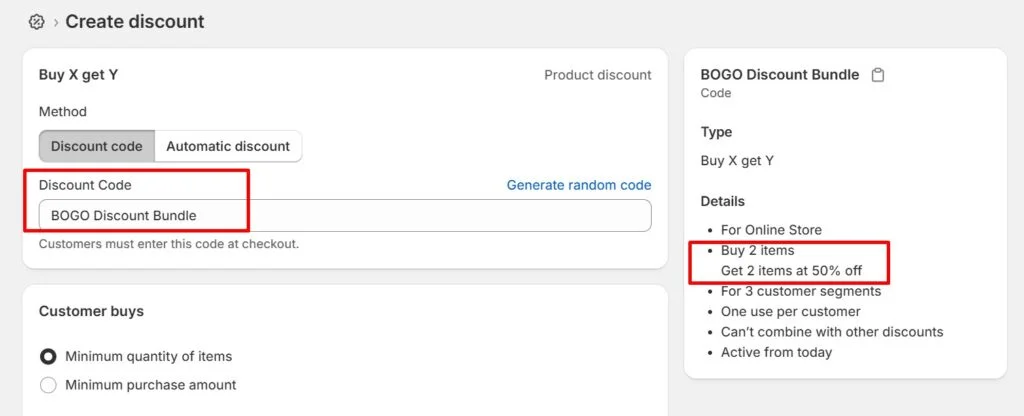
These BOGO offers make adding extra items easy and appealing to customers, further boosting average order value.
4. Personalized Product Suggestions
Show products that match what your customer just looked at or bought. Keep it simple, like two or three max. Any more feels like spam.
Where it works best:
- On product pages
- In the cart
- In post-purchase emails
Use customer behavior like browsing history and past orders to make it feel like a real recommendation, not a random guess.
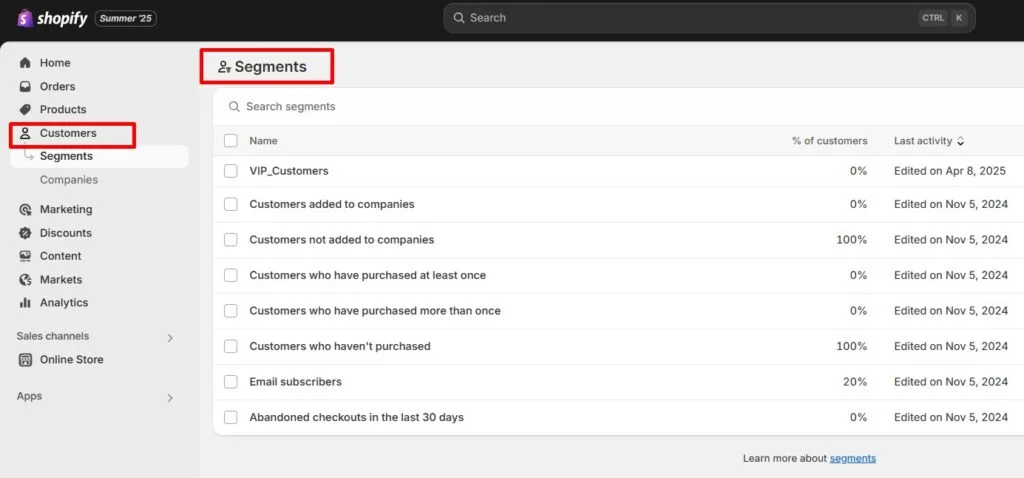
5. Cart and Checkout Upsells
The cart is a good place to make one last offer. Just do not slow people down.
Example: An electronics store suggests a screen protector after someone adds a phone. Makes sense. Feels relevant. And it is easy to skip if they are not interested.
Bonus: Tie it to a free shipping threshold. For example, “Add $5 more to unlock free shipping.” People respond to that.
6. Automated or AI-Driven Upsells
Let your tools do the work. You do not need to hand-pick every offer. Automation and AI can handle it.
Example: A coffee brand sees that a customer always buys light roast. Their next email? A new light roast with 15% off. Smart, targeted, and more likely to convert.
There are some superb Shopify mix and match bundle apps to help you set up upsell bundles using automated promotions. You set the rules once, and they start and end automatically. Check out the short video clip to see how it is done.
7. Email and SMS Upsells
Follow up after checkout. People are still thinking about your brand. This is the time to make another offer.
Here is a simple flow:
- Thank-you message + related product
- Day 3: “Others also bought…”
- Day 7: “Your 20% off ends soon.”
- Day 14: “VIP bundle offer”
People love short, clear messages. Keep it helpful. Keep it human.
Pro Tips and Mistakes to Avoid
Now that we know the upsell strategies, let us find out the common mistakes of Shopify upsells.
What works:
- Personalize based on past behavior
- Show just a few options
- Test different offers and placements
- Make sure everything works on mobile
What to avoid:
- Popups that interrupt too much
- Irrelevant or overpriced suggestions
- Ignoring data and guessing instead
- Forgetting about the mobile experience
Real Shopify Upsell Examples by Industry
| Industry | What It Looks Like |
| Apparel | “Complete the Look” bundles with a one-click add |
| Beauty | Buy 2, Get 1 Free deals shown after checkout |
| Electronics | Accessories and warranties suggested in cart or follow-up emails |
| Wellness | AI-powered product bundles matched to what is in the cart |
| Supplements | Reorder reminders with upsell offers sent by email or text |
| Pet Supplies | Toys and treats shown right after buying food or essentials |
| Home Decor | Pillow or side table suggestions with furniture orders |
Final Thoughts
A Shopify upsell deal does not have to be pushy. When it feels natural, it helps people find what they need and makes your store more profitable. Keep it relevant. Keep it simple. Make it easy to say yes.
We hope this article was helpful to you. For more expert tips like these, check out our other blogs. See you next time!
FAQs
1. What’s the easiest way to start upselling on Shopify?
Start with a simple post-purchase or one-click upsell. Use Shopify bundle apps to show product suggestions in the cart or at checkout.
2. What’s the difference between upselling and cross-selling?
Upselling means offering a better version or a bigger package. Cross-selling means suggesting a related item, like a phone case with a phone.
3. How do bundles boost order value?
Bundles group related items at a discount. It makes the purchase feel like a deal, and people often spend more.
4. What makes an upsell pop-up work?
Keep it clean. Limit to 2–3 products. Use strong visuals. One-click add-to-cart helps. Urgency or bonus offers can also help.
5. What data should I track?
Watch your upsell acceptance rate, average order value, and which products convert best. Tools like Shopify analytics or Google Analytics can help.
6. Can I automate upsells across my store?
Yes. With apps, you can set up rules or use AI to show upsells at different touchpoints.
7. How much should I price my upsells?
Add-ons usually work best when they cost 10%–25% of the main item. That way, it feels like a deal, not an extra burden.
Reviewed for accuracy
This article was reviewed by the PushBundle Technical Support Team, who regularly helps Shopify merchants test bundle setup, product selection rules, bundle pricing, cart behavior, and checkout-related bundle issues.
About the author

Anika Anamta Mehnaz
PushBundle Contributor
This article is written by Anika Anamta Mehnaz, a Content Writer and Content Marketing Strategist specializing in Shopify, eCommerce, and SaaS. With over four years of content writing experience, she creates SEO and AI search-optimized content that helps Shopify merchants make better business decisions through practical, research-backed insights. Her work covers Shopify apps, product variants, bundles, discounts, B2B commerce, and conversion-focused strategies. Outside of work, Anika enjoys watching anime, reading John Grisham novels, and discovering new ideas in digital marketing and e-commerce. If you enjoy discussing Shopify, content marketing, or online growth, feel free to connect with her. Twitter: https://x.com/mehnaz2201 Medium: https://medium.com/@mehnaz_78932


